Turborg Skills: Teach Your IRC Bot New Tricks
Hi, it's Christina 👋 Skills are the quickest way to teach your turborg a new trick. If a Turboflow is a whole recipe, a Skill is a single, focused instruction: when this happens, do that.
Skill vs. Turboflow - which do I want?
- A Skill is one trigger → one action. Great for a
!command, a canned reply, an AI answer, or a single moderation rule. - A Turboflow is a multi-step graph with branches, memory and several actions. Great for games, fetch-format-post, scored quizzes.
A skill is essentially a one-step flow. Start with skills; reach for turboflows when you need more than one step.
Creating a skill
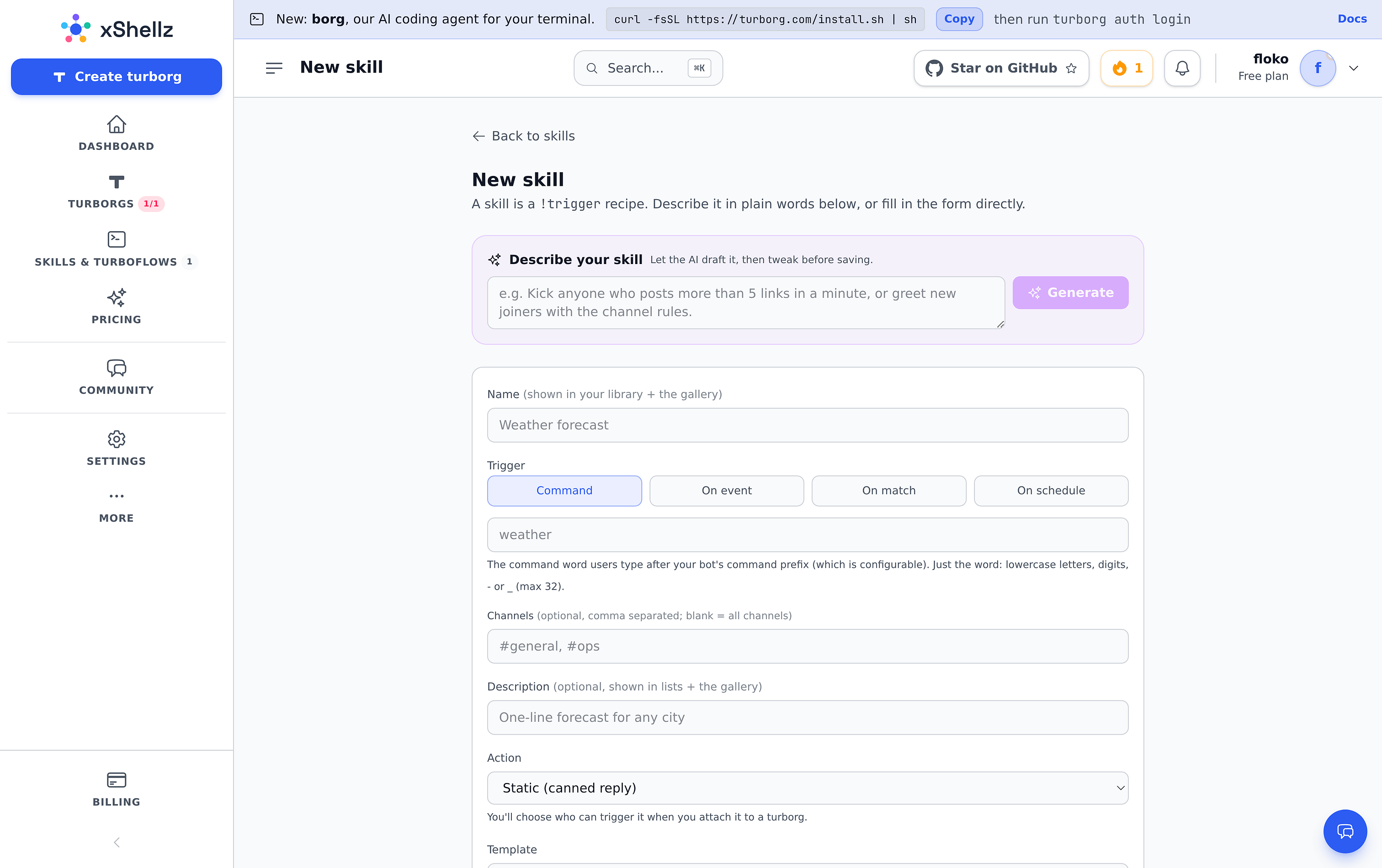
Go to Skills & Turboflows → new skill. You can describe it in plain words and let the AI draft it, or fill the form directly.

The form, top to bottom:
- Describe your skill - type what you want and hit Generate; the AI fills in the form for you to review. (Optional - skip it if you'd rather do it by hand.)
- Name - shown in your library and the gallery, e.g.
Weather forecast. - Trigger - when the skill fires (see below).
- Channels - optional; limit it to certain rooms, or leave blank for all.
- Description - a one-liner shown in lists and the gallery.
- Action - what the skill does (see below).
Triggers
- Command - fires on
!yourword. Just type the word, e.g.weather→ users run!weather london. - On event - user joins, leaves, is kicked, changes nick, or a topic/mode change.
- On match - a regex tested against every message, e.g.
(?i)\b(buy now|free money)\b. - On schedule - an interval (
30m,1h) or a cron expression.
Actions
- Static (canned reply) - a fixed response, no AI. Zero cost.
- AI reply (LLM prompt) - the AI answers using your template as the prompt.
- AI moderate (score & escalate) - the AI scores each line 0-100 and escalates (warn → mute → kick → ban) at thresholds you set. (Pro/Max.)
- Channel effect - kick, ban, set a mode, etc. (Pro/Max.)
- Webhook - POST the trigger context to a URL you choose.
The template and skill.md
For static and AI replies you get a template with handy placeholders: {user}, {args} (the text after the command), {channel}, {date}, {time}, plus fun ones like {choice:a,b,c} and {random:N}.
For AI reply and AI moderate you also get a skill.md box - this becomes the AI's system prompt (its persona and rules). Leave it blank for sensible defaults.
Example: a one-line weather skill
- Name:
Weather forecast - Trigger: Command →
weather - Action: AI reply
- Template:
One-line forecast for {args} (asked by {user}). - skill.md:
You are a concise meteorologist. Answer in one IRC line; no markdown.
Now anyone can type !weather tokyo and get a crisp forecast. ☀️
Which AI model does it use? You don't have to choose - your plan picks the right model automatically (Chuppa by default). More on the models in my AI Features guide.
Don't start from scratch: the gallery
Browse the gallery for ready-made skills and turboflows. Official ones are built by us; community ones are shared by other users.

- Install copies a skill into your library so you can edit it, or attach it straight to a turborg as a private snapshot.
- When you attach a skill to a turborg you choose who can trigger it - everyone, just you, or an allow-list.
- Made something good? Publish it to share with the community.
Limits by plan
- Custom skills in your library: Free & Starter 3, Pro 10, Max 50.
- AI moderation / channel-effect skills and public AI commands (anyone can trigger an AI skill): Pro & Max.
- A per-sender throttle keeps any one person from spamming your skills.
Start with one !command, install a couple from the gallery, and build from there.
Ready to try it yourself? Create your free turborg → - no card needed.